Source: Agents.jl tutorial. Wikipedia
Agents : They belong to one of two groups (0 or 1).
Model : Each position of the grid can be occupied by at most one agent.
For each step
If an agent has at least 3 neighbors belonging to the same group, then it is happy.
If an agent is unhappy, it keeps moving to new locations until it is happy.
To define an agent type, we should make a mutable struct derived from AbstractAgent with 2 mandatory fields:
id::Int. The identifier number of the agent.pos. For agents on a 2D grid, the position field should be a tuple of 2 integers.
On top of that, we could define other properties for the agents.
Setup
First, we create a 2D space with a Chebyshev metric. This leads to 8 neighboring positions per position (except at the edges of the grid).
using Agents
using Random
using Base64
using CairoMakie
CairoMakie.activate!(px_per_unit = 1.0)
The helper function displays video files in Jupyter notebooks
function display_mp4(filename)
    display("text/html", string("""<video autoplay controls><source src="data:video/x-m4v;base64,""",
        base64encode(open(read, filename)),
        """" type="video/mp4"></video>"""))
end
display_mp4 (generic function with 1 method)Define the Agent type using the @agent macro.
The agents inherit all properties of GridAgent{2} sicne they live on a 2D grid. They also have two properties: mood (happy or not) and group.
@agent struct SchellingAgent(GridAgent{2})
    mood::Bool = false ## true = happy
    group::Int ## the group does not have a default value!
end
Define the stepping function for the agent nearby_agents(agent, model) lists neighbors.
If there are over 2 neighbors of the same group, make the agent happy.
Else, the agent will move to a random empty position
function schelling_step!(agent::SchellingAgent, model)
    minhappy = model.min_to_be_happy
    count_neighbors_same_group = 0
    for neighbor in nearby_agents(agent, model)
        if agent.group == neighbor.group
            count_neighbors_same_group += 1
        end
    end
    if count_neighbors_same_group ≥ minhappy
        agent.mood = true ## The agent is happy
    else
        agent.mood = false
        move_agent_single!(agent, model) ## Move the agent to a random position
    end
    return nothing
end
schelling_step! (generic function with 1 method)It is recommended to use a function to create the ABM for easily alter its parameters.
function init_schelling(; numagents = 300, griddims = (20, 20), min_to_be_happy = 3, seed = 2024)
    # Create a space for the agents to reside
    space = GridSpace(griddims)
    # Define parameters of the ABM
    properties = Dict(:min_to_be_happy => min_to_be_happy)
    rng = Random.Xoshiro(seed)
    # Create the model
    model = StandardABM(
        SchellingAgent, space;
        properties, rng,
        agent_step! = schelling_step!,
        container = Vector, ## agents are not removed, this is faster
        scheduler = Schedulers.Randomly()
    )

    # Populate the model with agents, adding equal amount of the two types of agents at random positions in the model.
    # We don't have to set the starting position. Agents.jl will choose a random position.
    for n in 1:numagents
        add_agent_single!(model; group = n < 300 / 2 ? 1 : 2)
    end
    return model
end
init_schelling (generic function with 1 method)Running the model
model = init_schelling()StandardABM with 300 agents of type SchellingAgent
agents container: Vector
space: GridSpace with size (20, 20), metric=chebyshev, periodic=true
scheduler: Agents.Schedulers.Randomly
properties: min_to_be_happyThe step!() function evolves the model forward. The run!() function is similar to step!() but also collects data along the simulation.
Progress the model by one step.
step!(model)StandardABM with 300 agents of type SchellingAgent
agents container: Vector
space: GridSpace with size (20, 20), metric=chebyshev, periodic=true
scheduler: Agents.Schedulers.Randomly
properties: min_to_be_happyProgress the model by 3 steps
step!(model, 3)StandardABM with 300 agents of type SchellingAgent
agents container: Vector
space: GridSpace with size (20, 20), metric=chebyshev, periodic=true
scheduler: Agents.Schedulers.Randomly
properties: min_to_be_happyProgress the model until 90% of the agents are happy
happy90(model, time) = count(a -> a.mood == true, allagents(model))/nagents(model) ≥ 0.9
step!(model, happy90)
StandardABM with 300 agents of type SchellingAgent
agents container: Vector
space: GridSpace with size (20, 20), metric=chebyshev, periodic=true
scheduler: Agents.Schedulers.Randomly
properties: min_to_be_happyHow many steps are passed
abmtime(model)4Visualization
The abmplot() function visulizes the simulation result using Makie.jl.
Some helper functions to identify agent groups.
groupcolor(a) = a.group == 1 ? :blue : :orange
groupmarker(a) = a.group == 1 ? :circle : :rect
groupmarker (generic function with 1 method)Plot the initial conditions of the model
model = init_schelling()
figure, _ = abmplot(model; agent_color = groupcolor, agent_marker = groupmarker, agent_size = 15, axis=(;title = "Schelling's segregation model"))
figure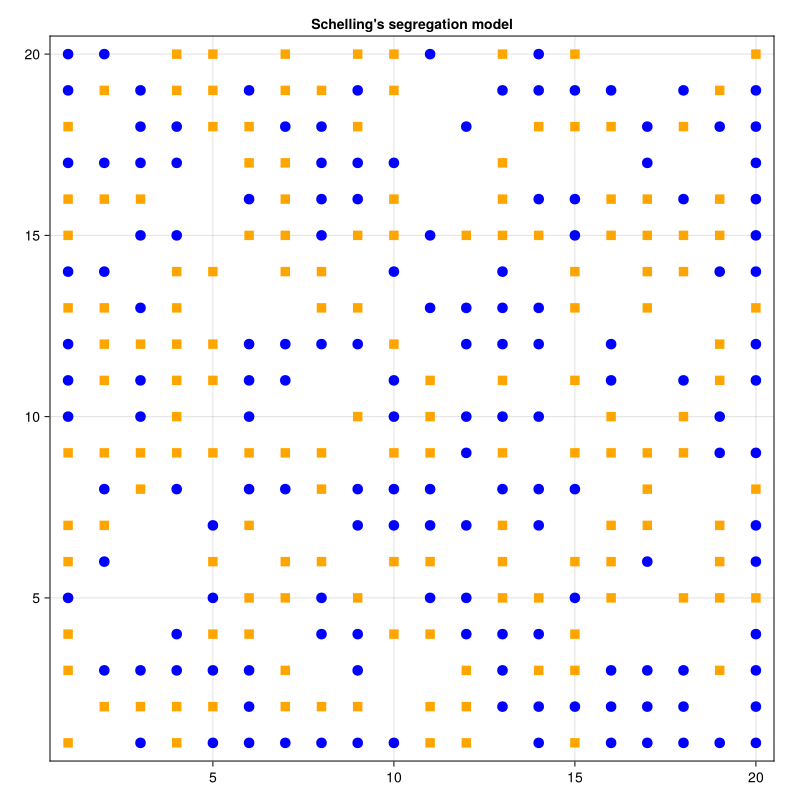
Let’s make an animation for the model evolution.
model = init_schelling()
abmvideo(
    "schelling.mp4", model;
    agent_color = groupcolor, agent_marker = groupmarker, agent_size = 10,
    framerate = 4, frames = 25,
    title = "Schelling's segregation model"
)

display_mp4("schelling.mp4")Data analysis
The run!() function runs simulation and collects data in the DataFrame format. The adata (aggregated data) keyword selects fields we want to extract in the DataFrame.
x(agent) = agent.pos[1]
adata = [x, :mood, :group]
model = init_schelling()
adf, mdf = run!(model, 5; adata)
adf[end-10:end, :] ## display only the last few rowsThis notebook was generated using Literate.jl.